How much of your website is AI slop?Sitenin ne kadarı AI slop?
AI Slop Meter reads every page, scores it from 0 to 100 and tells you what to change, down to the file and line. Then your own AI makes the changes.
AI Slop Meter sitenin her sayfasını okur, 0'dan 100'e puanlar ve neyi değiştirmen gerektiğini dosya ve satırına kadar söyler. Değişiklikleri de kendi yapay zekân yapar.
claude mcp add --scope user aislopmeter -- npx -y aislopmeter mcp
That line is for Claude Code and installs it once for all your projects; other tools are under Install. To try it once without installing: npx -y aislopmeter https://your-site.com --open
Bu satır Claude Code için; bir kez kurar, bütün projelerinde çalışır. Diğer araçlar Kurulum bölümünde. Kurmadan bir kez denemek için: npx -y aislopmeter https://siten.com --open --lang tr
Same product, same factsAynı ürün, aynı bilgiler
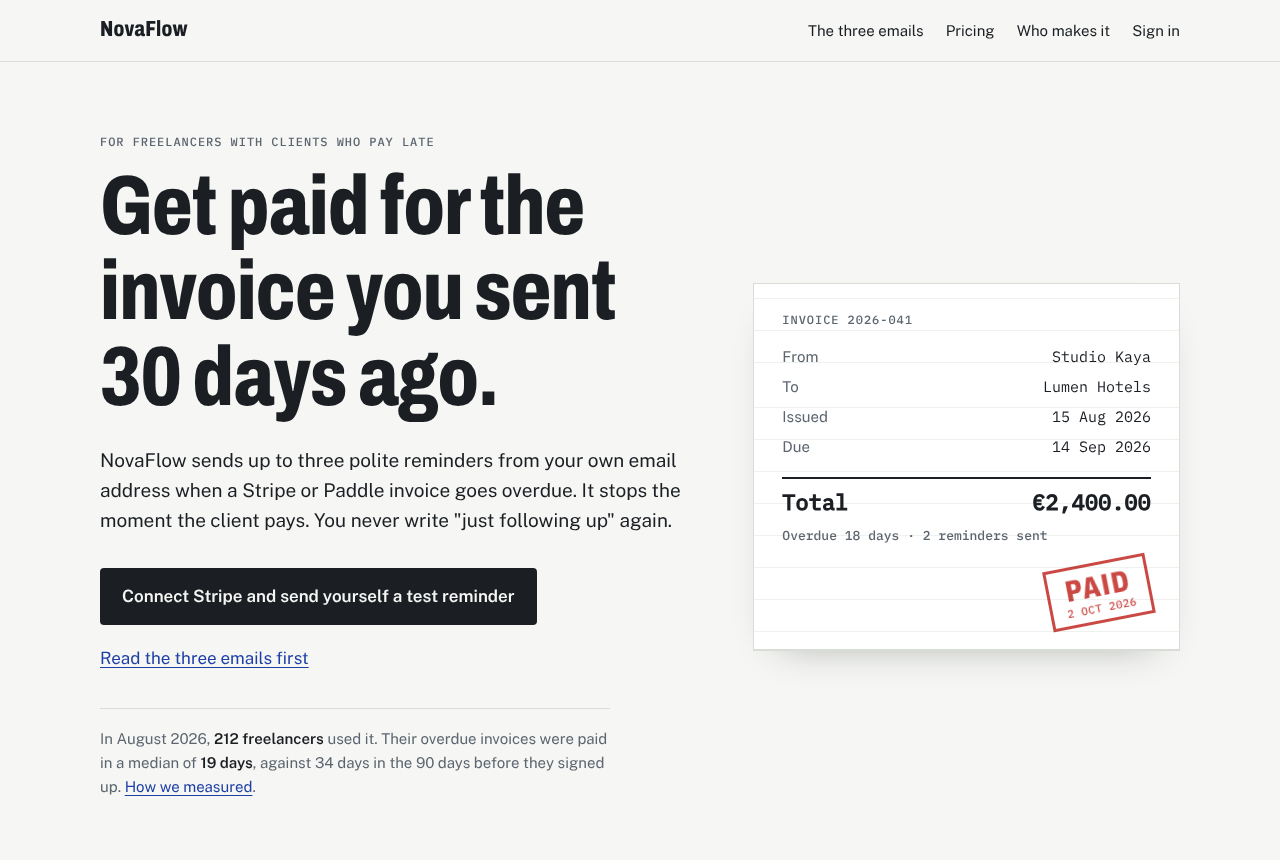
Before: a page a site builder produced from one prompt. Purple gradient, emoji icons, three identical cards, "seamless" and "cutting-edge". After: the owner answered the plan's questions, and the page was rewritten with those answers. Drag the line to compare.
Önce: bir site aracının tek prompt'la ürettiği sayfa. Mor gradyan, emoji ikonlar, birbirinin aynı üç kart, "sorunsuz" ve "son teknoloji". Sonra: sahibi planın sorularını cevapladı, sayfa bu cevaplarla yeniden yazıldı. Karşılaştırmak için çizgiyi sürükle.
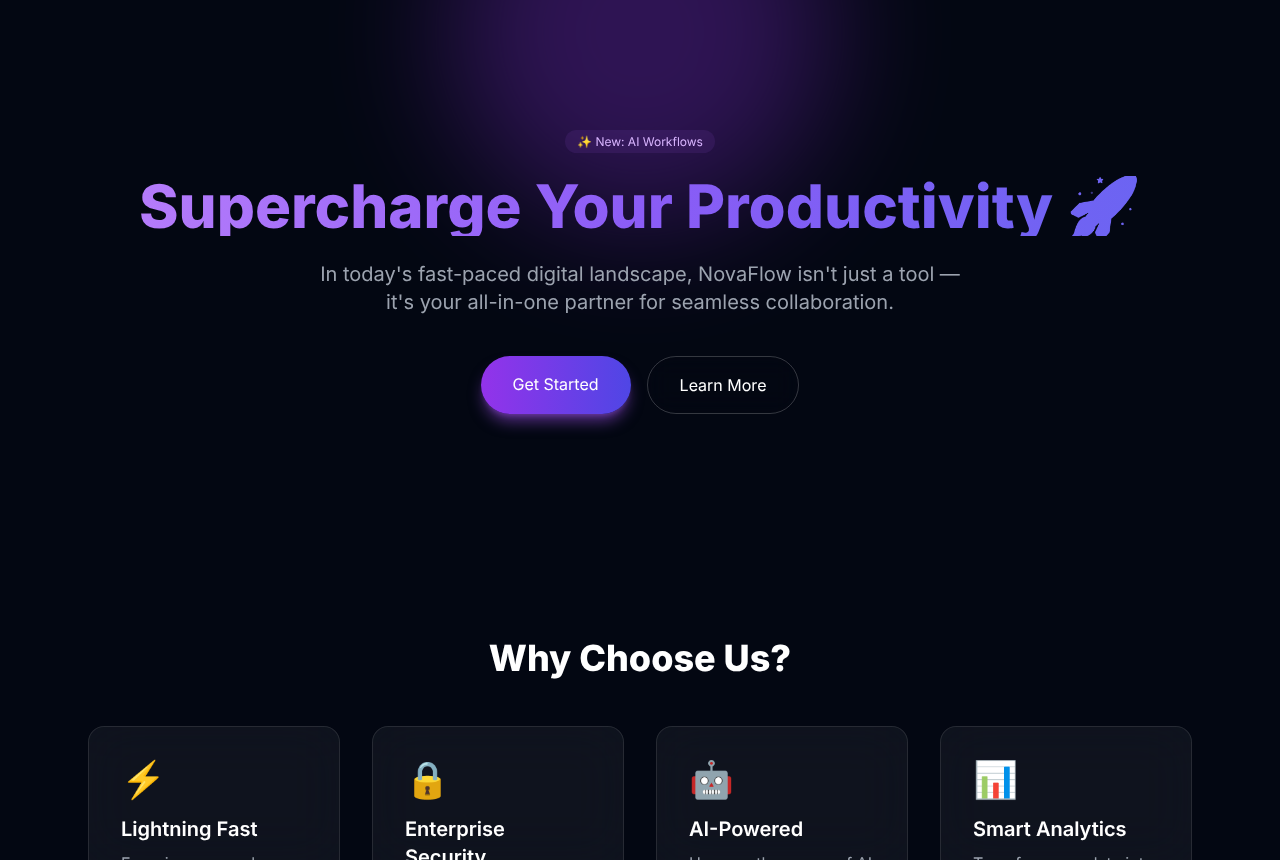
 BeforeÖnce · 83
AfterSonra · 1
BeforeÖnce · 83
AfterSonra · 1
NovaFlow is a made-up product and its figures are fictional. Both pages are in the repo under examples/novaflow, so you can scan them yourself.
NovaFlow uydurma bir ürün, rakamları da kurgu. İki sayfa da repoda examples/novaflow altında, kendin tarayabilirsin.
Where the 100 points come from100 puan nereden geliyor
More than 80 checks, each written from published research and design reviews, each with the evidence it found. It reads your stylesheets and scripts too. A page needs problems in several areas to score high, so a purple brand colour alone is never "slop".
80'den fazla kontrol var. Her biri yayımlanmış araştırmalardan ve tasarım incelemelerinden çıkarıldı, her biri bulduğu kanıtı gösteriyor. Stil ve script dosyalarını da okur. Yüksek skor için birden fazla alanda sorun olmalı; yani sadece mor bir marka rengi asla "slop" sayılmaz.
-
Substanceİçerik özü
30 pointspuanCould this sentence sit on any other company's site? Counts prices, names, places, dates and claims you can check, against invented stats, stock-photo testimonials and countdowns that reset.
Bu cümle başka bir şirketin sitesinde de durabilir mi? Fiyat, isim, yer, tarih ve doğrulanabilir iddiaları; uydurma istatistiklere, stok fotoğraflı yorumlara ve sıfırlanan geri sayımlara karşı tartar.
-
LanguageDil
22 pointspuan"Not just X, it's Y", lists of three, "unlock", "elevate", "in today's fast-paced world". English and Turkish word lists, measured per thousand words so one brand name does not count as a habit.
"Sadece X değil, Y", üçlü listeler, "kilidini açın", "bir üst seviyeye taşıyın", "günümüzün hızla değişen dünyasında". İngilizce ve Türkçe kelime listeleri; bin kelimeye oranla ölçülür, tek bir marka adı alışkanlık sayılmaz.
-
DesignTasarım
28 pointspuanPurple-to-blue gradients, glowing panels, emoji used as icons, identical cards, Tailwind's default colours, the standard landing-page and portfolio templates, typing effects and custom cursors, and the newer defaults: cream with terracotta, acid green on black.
Mordan maviye gradyanlar, parlayan paneller, ikon yerine emoji, birbirinin aynı kartlar, Tailwind'in varsayılan renkleri, standart açılış sayfası ve portfolyo şablonları, daktilo efektleri ve özel imleçler, bir de yeni varsayılanlar: krem üstüne kiremit, siyah üstüne asit yeşili.
-
Unfinished detailsÖzensiz detaylar
15 pointspuan“Lorem ipsum”, links to "#", "Vite + React + TS" left in the tab title, "Certainly! Here is…" pasted from a chat, missing alt text, removed focus outlines.
“Lorem ipsum”, "#" adresine giden linkler, sekme başlığında kalmış "Vite + React + TS", sohbetten yapıştırılmış "Elbette! İşte…", eksik alt metinler, kaldırılmış odak çerçeveleri.
-
Builder tracesÜretici izleri
5 pointspuanLovable, Bolt, v0, Replit and Base44 leave tags behind. Shown for information: using a builder is not slop by itself.
Lovable, Bolt, v0, Replit ve Base44 geride iz bırakır. Bilgi olarak gösterilir: bir araç kullanmak tek başına slop değildir.
Next to the slop score you also get an AI search readiness score: can ChatGPT, Claude, Perplexity and Gemini read the page, tell who is behind it and quote it? It checks structured data, robots.txt for AI crawlers, llms.txt, the sitemap and whether the text is there without JavaScript.
Slop skorunun yanında bir de AI arama hazırlığı puanı var: ChatGPT, Claude, Perplexity ve Gemini sayfayı okuyabiliyor, arkasında kimin olduğunu anlayıp alıntılayabiliyor mu? Yapısal veriye, AI tarayıcıları için robots.txt'ye, llms.txt dosyasına, site haritasına ve metnin JavaScript olmadan da orada olup olmadığına bakar.
Real addresses, named people, prices, legal details and links to independent reviews lower the score. The full list with sources is in docs/CRITERIA.md.
Gerçek adres, isimli kişiler, fiyatlar, yasal bilgiler ve bağımsız yorum linkleri skoru düşürür. Kaynaklarıyla tam liste docs/CRITERIA.md dosyasında.
From score to fixed pageSkordan düzeltilmiş sayfaya
You can stop after any step. Each one is useful on its own.
Herhangi bir adımdan sonra bırakabilirsin. Her biri tek başına işe yarar.
-
Scan the whole siteBütün siteyi tara
Give it a URL and it finds the pages through the sitemap and the links between them, up to 30 by default, 200 with
--pages all. It follows robots.txt. A project folder works too, and then every finding points at a file and line.Bir URL ver, sayfaları site haritasından ve aralarındaki linklerden bulur. Varsayılan olarak 30 sayfaya,
--pages allile 200'e kadar tarar ve robots.txt'ye uyar. Proje klasörü de verebilirsin; o zaman her bulgu bir dosyayı ve satırı gösterir.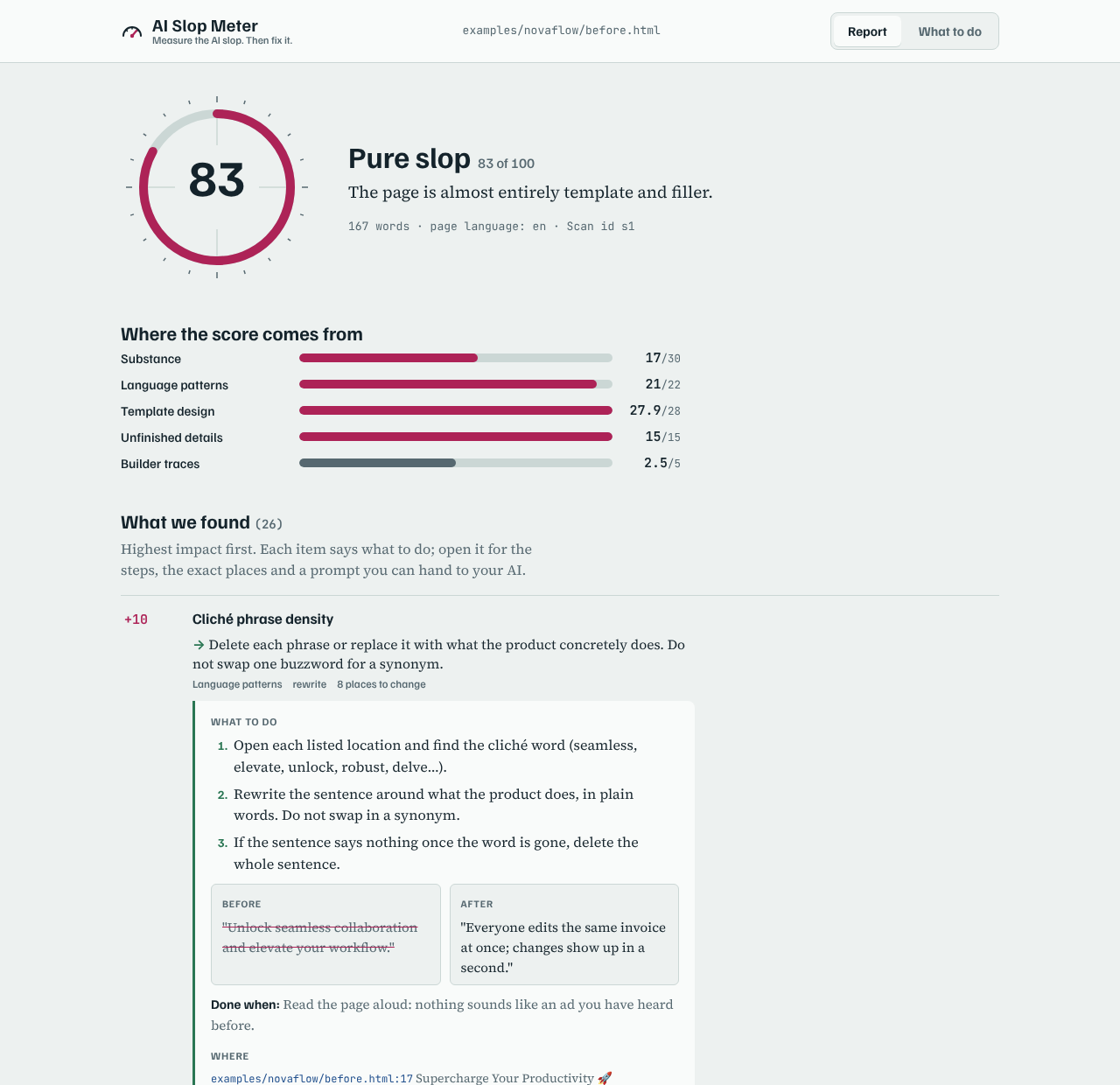
-
Read what to do, not only what is wrongNeyin yanlış olduğunu değil, ne yapacağını oku
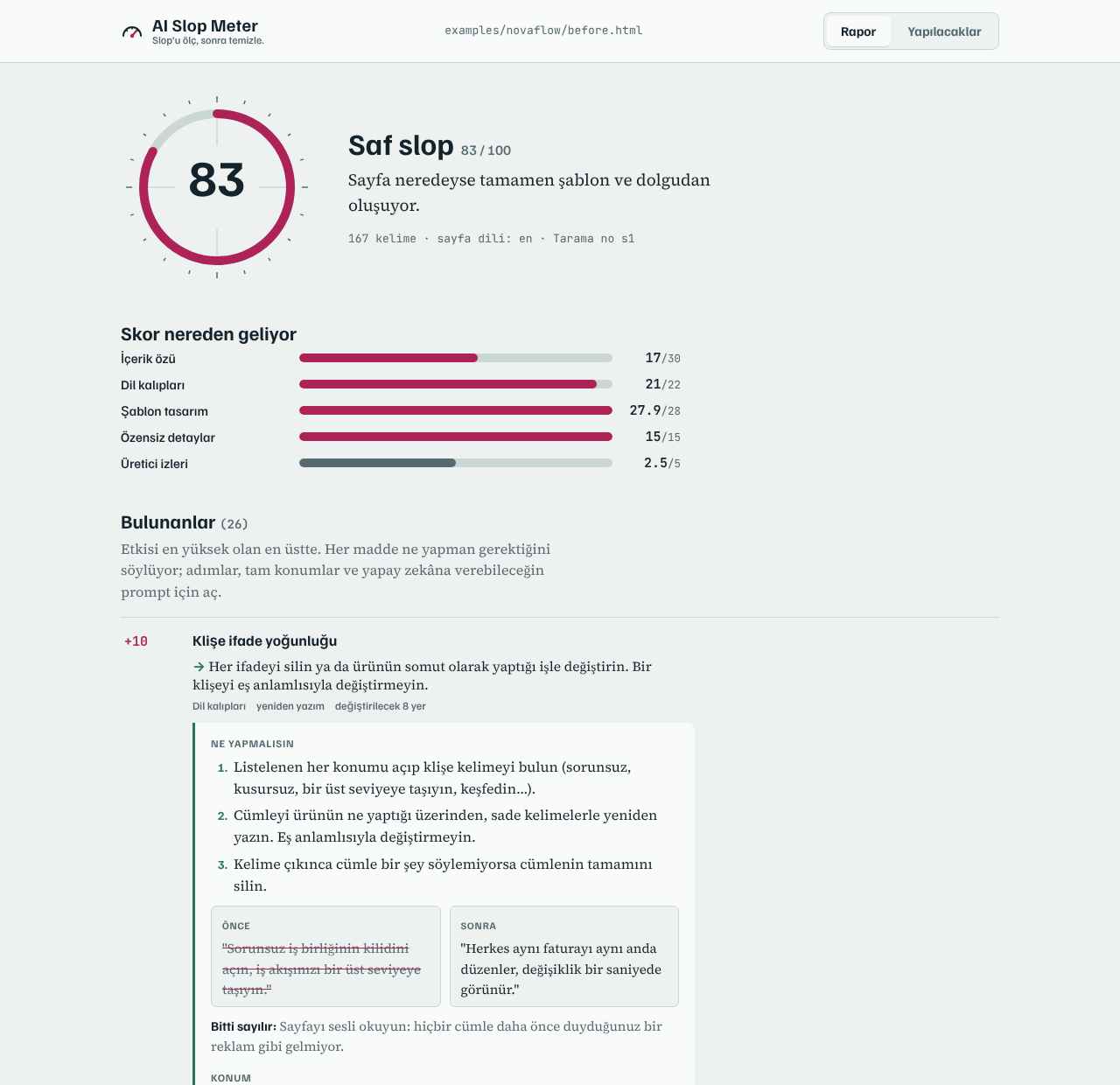
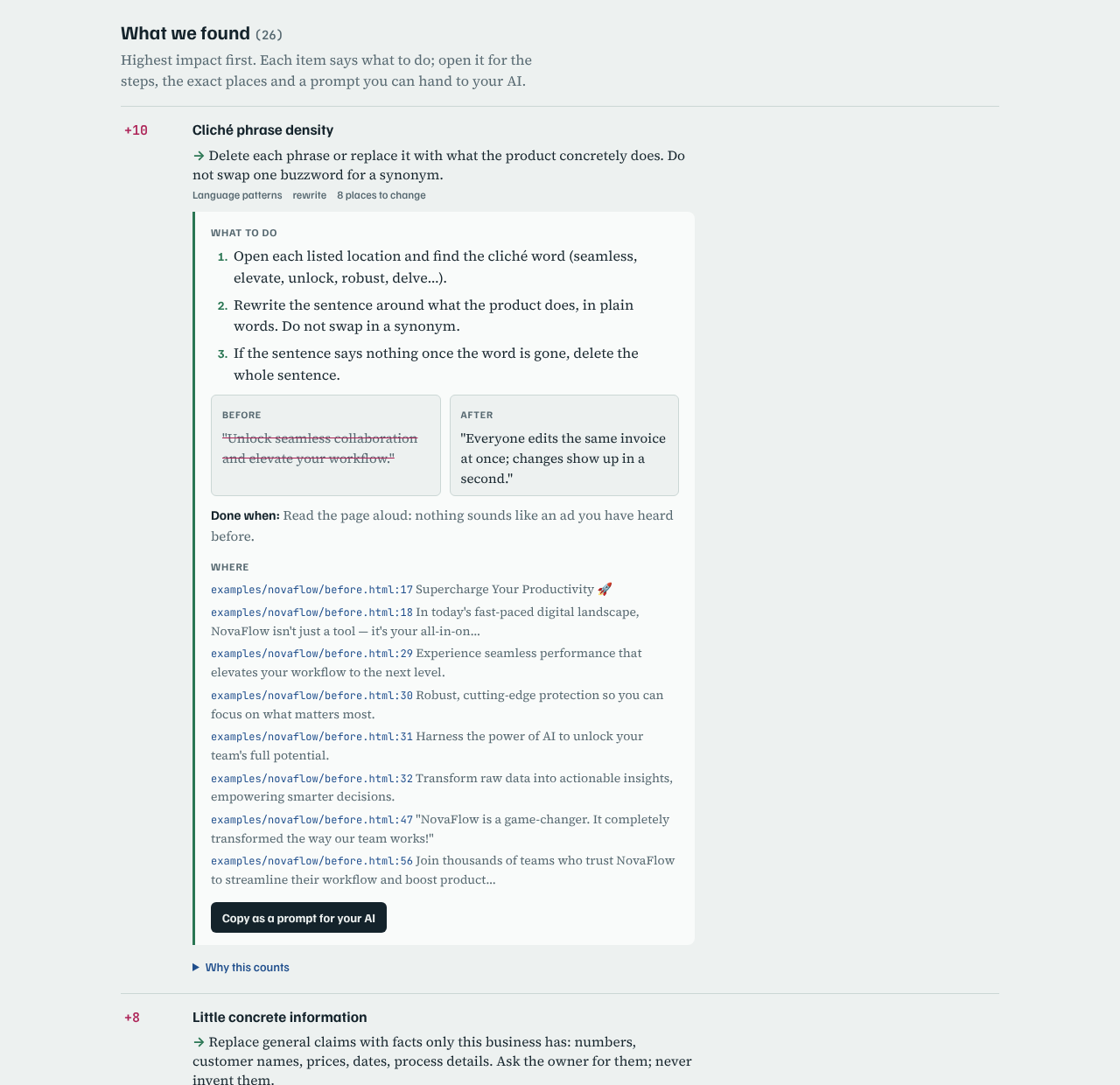
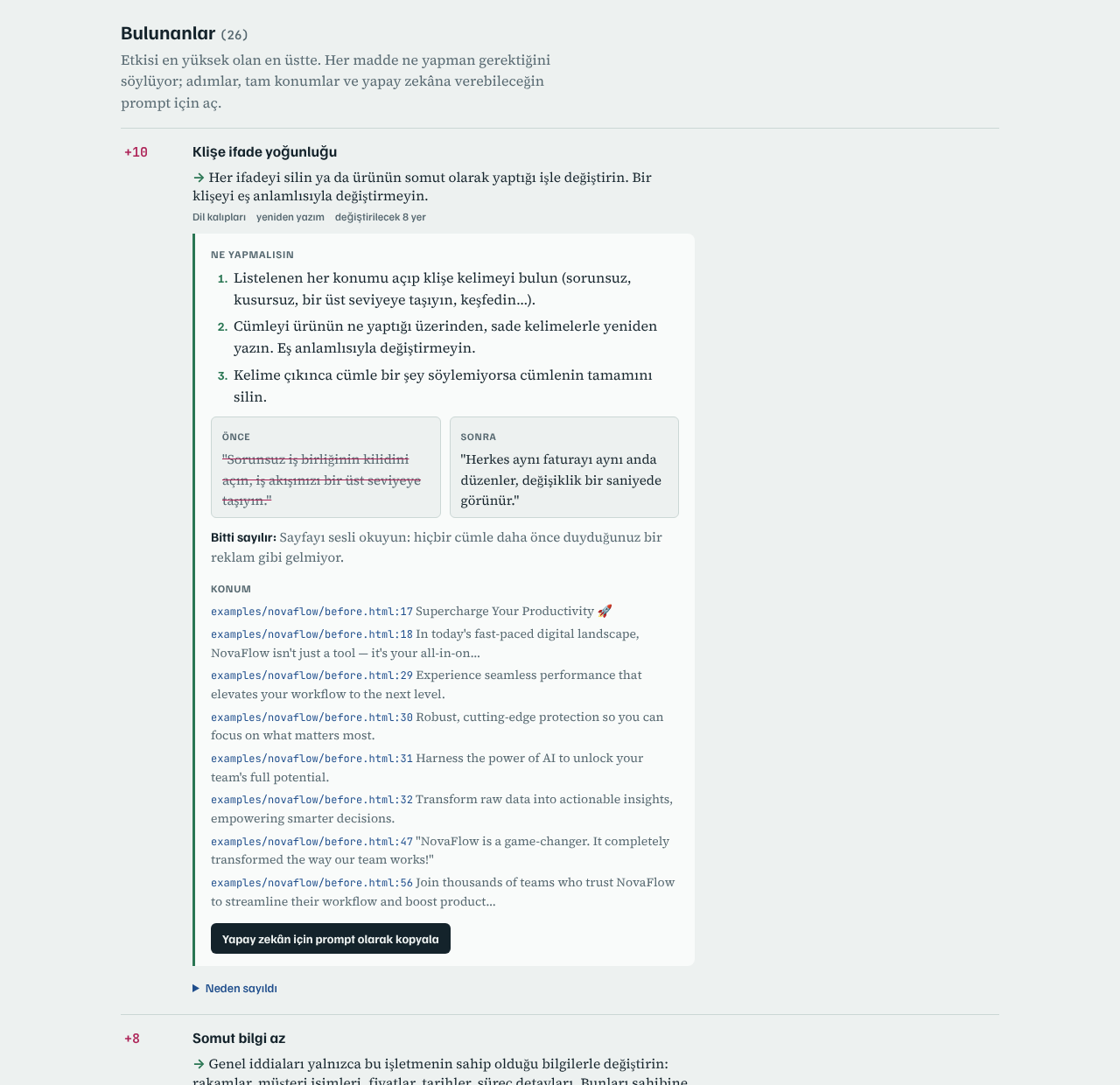
Each finding opens to numbered steps, a before and after example, the exact lines to change and a check for when it is done. Every page also gets its own score and list, worst page first.
Her bulgu açıldığında numaralı adımlar, bir önce/sonra örneği, değişecek satırlar ve ne zaman bitmiş sayılacağı yazıyor. Her sayfanın da kendi skoru ve listesi var, en kötü sayfa en üstte.
-
Let your AI do it, one problem at a timeYapay zekân yapsın, her seferinde bir sorun
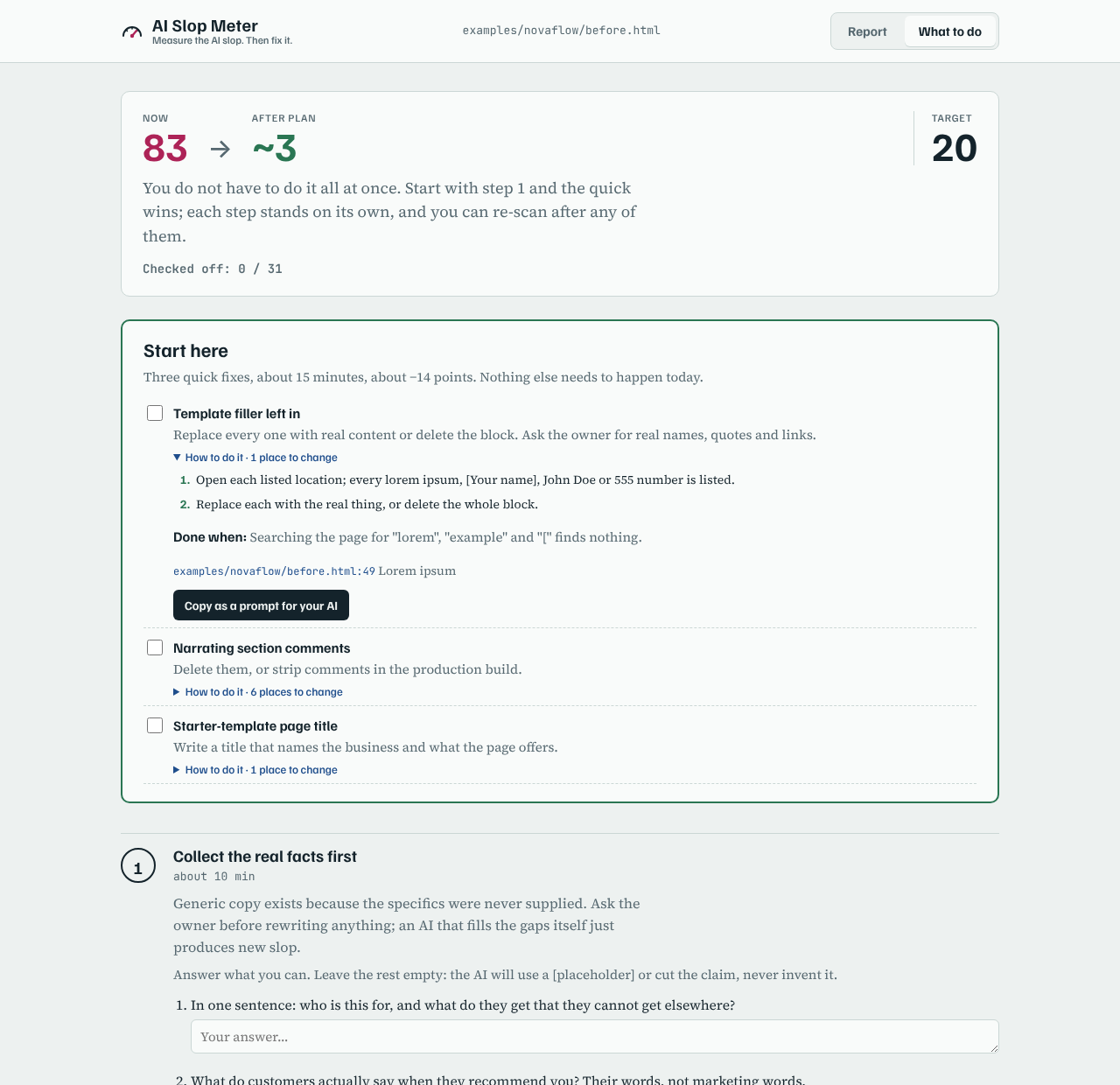
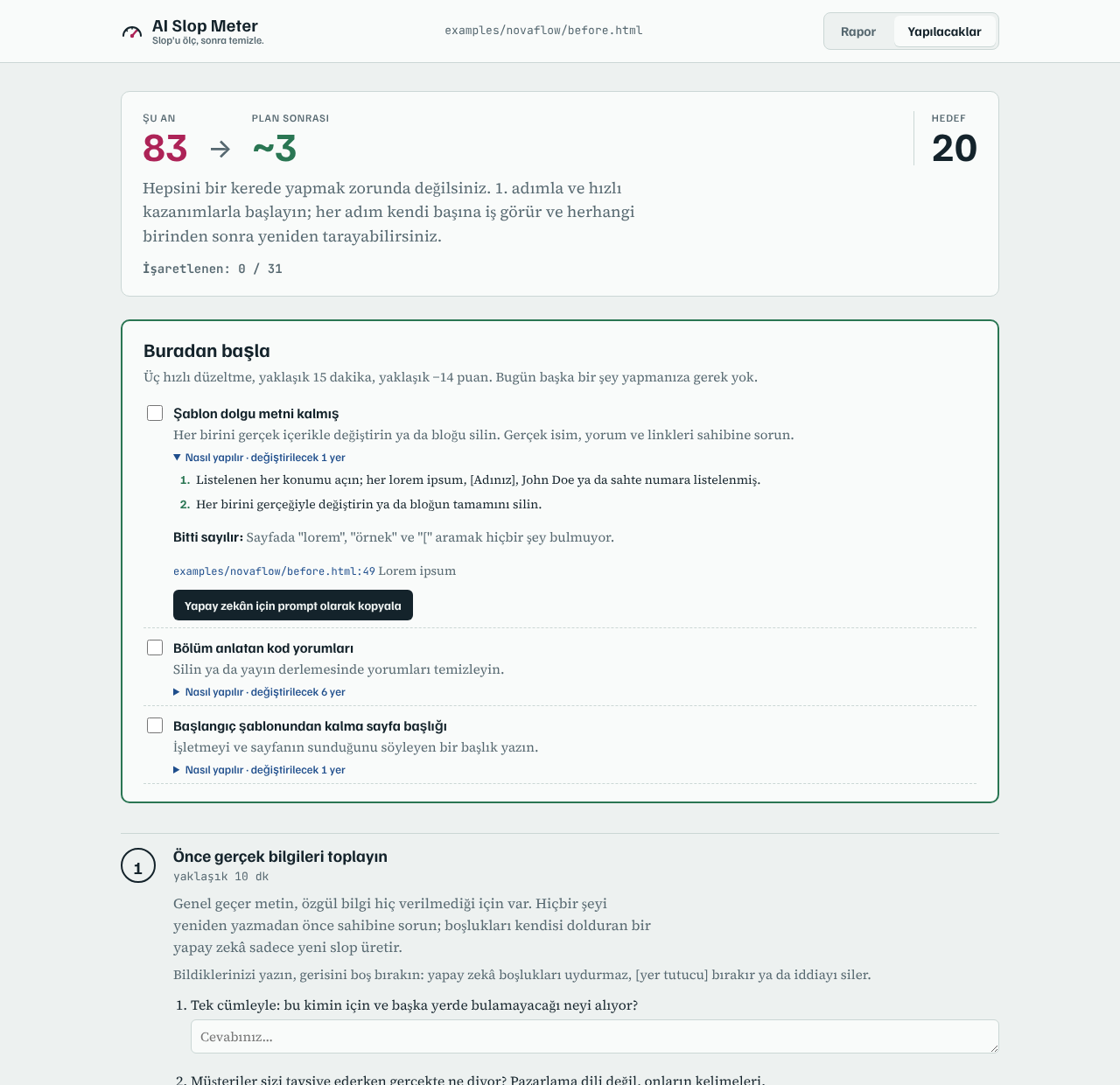
Copy any finding as a prompt, or let the AI connected to AI Slop Meter work through the plan. It asks you for the facts it cannot know, like prices, names and real quotes, instead of making them up.
Herhangi bir bulguyu prompt olarak kopyala ya da AI Slop Meter'a bağlı yapay zekânın planı uygulamasına izin ver. Fiyat, isim ve gerçek yorum gibi bilemeyeceği bilgileri uydurmak yerine sana sorar.
-
Measure againTekrar ölç
Scanning the same target again prints what went down, what is still open and what is new. When it finishes, it can open the report in your browser if you said yes at the start, so the result is waiting when you are back.
Aynı hedefi tekrar taramak neyin düştüğünü, neyin açık kaldığını ve neyin yeni olduğunu yazar. İş bitince, başta izin verdiysen raporu tarayıcında açar; bilgisayara döndüğünde sonuç seni bekler.
Before Önce After Sonra ScoreSkor 83 1 Substance İçerik özü 17 0 Language Dil 21 0 Design Tasarım 27.9 1 Unfinished details Özensiz detaylar 15 0
InstallKurulum
Pick your tool. Apart from the Claude Desktop extension you need Node.js 20 or newer. No account and no API key: it runs on your computer and uses the AI you already have. Every command, in order, with examples: the usage guide.
Aracını seç. Claude Desktop eklentisi dışında Node.js 20 ya da üstü gerekir. Hesap ya da API anahtarı yok: senin bilgisayarında çalışır ve zaten kullandığın yapay zekâyı kullanır. Bütün komutlar sırasıyla ve örnekleriyle: kullanım kılavuzu.
Claude Code
claude mcp add --scope user aislopmeter -- npx -y aislopmeter mcpOr as a plugin, with a rescue skill: /plugin marketplace add omergocmen/aislopmeter then /plugin install aislopmeter@aislopmeter
Ya da kurtarma becerisiyle birlikte plugin olarak: /plugin marketplace add omergocmen/aislopmeter, sonra /plugin install aislopmeter@aislopmeter
Claude Desktop, Cursor, Gemini CLI, Windsurf
Add this to the tool's MCP settings file. For Cursor, ~/.cursor/mcp.json makes it work in every project.
Aracın MCP ayar dosyasına ekle. Cursor için ~/.cursor/mcp.json dosyası her projede çalışmasını sağlar.
{
  "mcpServers": {
    "aislopmeter": {
      "command": "npx",
      "args": ["-y", "aislopmeter", "mcp"]
    }
  }
}
Then just askSonra sadece söyle
Scan https://my-site.com for AI slop and show me what to fix. Open the report when you are done.
https://sitem.com adresini AI slop açısından tara ve neyi düzeltmem gerektiğini göster. Bitince raporu aç.
Or run the built-in prompts: rescue takes the whole site to a target score, fix fixes only the most important problem and shows the difference.
Ya da hazır komutları kullan: rescue bütün siteyi hedef skora indirir, fix sadece en önemli sorunu düzeltip farkı gösterir.
In the browser, no installTarayıcıda, kurulumsuz
Drag this to your bookmarks bar, then click it on any page: AI Slop Meter
Bunu yer imleri çubuğuna sürükle, sonra herhangi bir sayfada tıkla: AI Slop Meter
Command line and CIKomut satırı ve CI
npx -y aislopmeter https://site.com --open
npx -y aislopmeter ./my-app --plan --lang tr
npx -y aislopmeter ./dist --fail-above 40
Apps that are not online yetHenüz yayında olmayan uygulamalar
It runs on your computer, so it reaches localhost. Scan the dev server for what you see, and the project folder for file and line.
Senin bilgisayarında çalıştığı için localhost'a ulaşır. Gördüğün hali için geliştirme sunucusunu, dosya ve satır için proje klasörünü tara.
npx -y aislopmeter localhost:3000 --open
npx -y aislopmeter . --plan
Tested on 33 real sites33 gerçek sitede denendi
On 17 October 2026, 21 home pages built with Lovable, Bolt and similar tools were scanned next to 12 hand-made ones, from jvns.ca and paulgraham.com to webrazzi.com. Every finding on a hand-made site was checked by hand; the wrong ones were fixed in 0.2.1 and each has a test.
17 Ekim 2026'da Lovable, Bolt ve benzeri araçlarla yapılmış 21 ana sayfa, jvns.ca ve paulgraham.com'dan webrazzi.com'a elle yapılmış 12 siteyle birlikte tarandı. Elle yapılmış sitelerdeki her bulgu tek tek kontrol edildi; yanlış olanlar 0.2.1'de düzeltildi ve her biri için test var.
-
Built with AI toolsAI araçlarıyla yapılmış21 sites, median 2721 site, medyan 27
medianmedyan -
Hand-madeElle yapılmış12 sites, median 11.512 site, medyan 11,5
medianmedyan
No hand-made site reached 20. Small AI-built tools with little copy, like a Sudoku game, score as low as hand-made pages, because the score is about what a reader sees, not who built it. Sites, scores and method: docs/CALIBRATION.md.
Elle yapılmış hiçbir site 20'ye ulaşmadı. Az metinli küçük AI araçları (örneğin bir Sudoku oyunu) elle yapılmış sayfalar kadar düşük puan alıyor; çünkü skor kimin yaptığını değil, okuyanın ne gördüğünü ölçüyor. Siteler, puanlar ve yöntem: docs/CALIBRATION.md.
What it is notNe değildir
Worth knowing before you trust a number.
Bir sayıya güvenmeden önce bilmekte fayda var.
Not an AI detectorAI dedektörü değil
It measures what readers notice, not who typed it. A page written with AI can score 0; a page typed by hand can score 70.
Kimin yazdığını değil, okuyanın neyi fark ettiğini ölçer. Yapay zekâyla yazılmış bir sayfa 0, elle yazılmış bir sayfa 70 alabilir.
Rules, not an AI judgeYapay zekâ hakem değil, kurallar
In the largest study on the question, language models asked "is this slop?" agreed with human editors no better than chance. So the score comes from rules you can read, and your AI is used only to fix.
Bu konudaki en kapsamlı çalışmada "bu slop mu?" diye sorulan dil modelleri insan editörlerle rastgeleden iyi uyuşmadı. Bu yüzden skor okuyabileceğin kurallardan gelir, yapay zekân sadece düzeltmek için kullanılır.
Nothing leaves your computerBilgisayarından bir şey çıkmaz
The only requests it makes are to the site you asked it to scan. Reports are saved in a folder on your machine. No telemetry.
Yaptığı tek istek taramasını istediğin siteye. Raporlar bilgisayarındaki bir klasöre kaydedilir. Telemetri yok.